
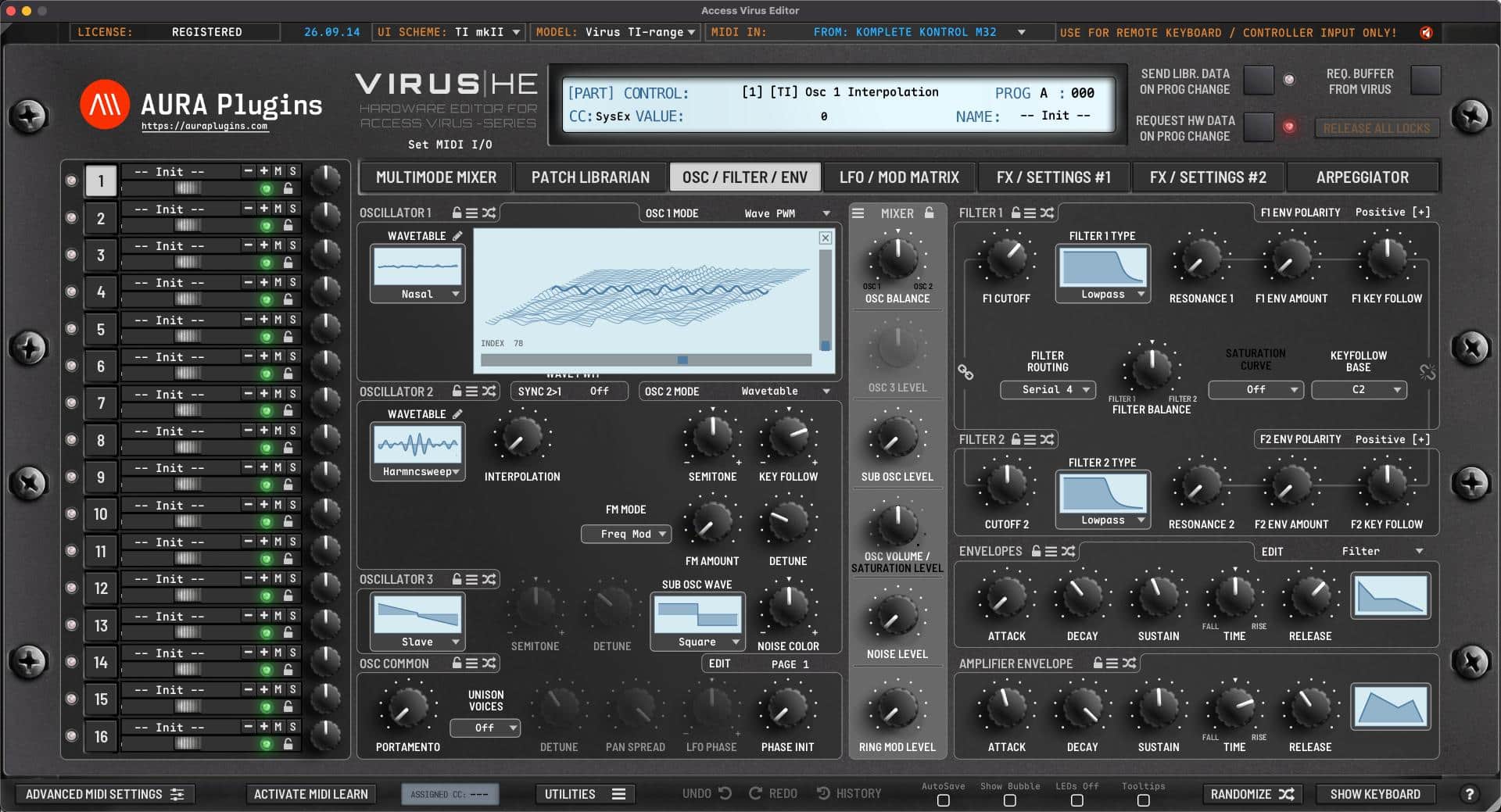
Download Access Virus Editor & Librarian
Hardware Editor and Librarian for Access Virus (all models).
It is time to reconnect – don’t leave the hardware behind
Hardware requirements
– Any of the following Access Virus models: A, B, KB, Indigo, Rack, Classic, C, KC, Indigo 2, Rack XL, TI, TI Snow, TI2 or TI Pølar
– MIDI Interface with SysEx support OR
– Direct USB connection to computer
Virus TI users with macOS 10.15 or greater:
Option #1: Use our “Virus TI USB Plugin I/O” driver after install. USB Audio stream works too. Full details here.
Option #2: Unplug the USB from the Virus TI and use regular MIDI cables.
Option #3: Get a good USB to MIDI interface, like ESI MIDIMATE EX
Latest version: 26-09-23 | 2026-Sep-23
User Manual
Can’t see your license and downloads?
Refresh page after login to view FULL downloads and license
FULL Downloads require license purchase from our store.
Demo Limitations to be aware of:
- Parameters can not be automated from your DAW.
- Parameter MIDI CC Mapping is disabled.
- Parts 2-15 are disabled (if applicable).
- Total Recall is disabled.
- UI Data can not be saved or loaded.
- MIDI CC Mapping Data can not be saved or loaded.
- Librarian Bank Edits can not be saved.
- Librarian "Store Data to Hardware" is disabled.
- Demo can not be registered.
Install and Launch instructions
Download the installer for macOS or Windows.
- Extract the zip file on Windows.
Open the installer executable and run it.
- Select all plugin formats to install - otherwise it will fail.
- Read the hardware and DAW configuration guides from our documentation site. Link below.
Optional:
If you have banks you've purchased for the specific product, copy them to:
~/Music/AURA Plugins/(product name)/Patches/ folder.
- Open the plugin or Standalone application and you can view your banks in the Patch Librarian tab.
- Enjoy!
- Support our continuous development via https://ko-fi.com/auraplugins!
Available plug-in formats
- VST2 (macOS and Windows)
- VST3 (macOS and Windows)
- AAX (macOS and Windows)
- Audio Unit (macOS)
- Standalone Application (macOS and Windows)
64-bit macOS or Windows
System requirements
Windows 7 or greater (64 bit)
macOS 10.12 (High Sierra) or greater with Metal graphics
Intel & Apple Silicon
Please ensure system and DAW compatibility with the plug-in or standalone application DEMO before committing to purchasing a full license. All purchases are final.




VST is a trademark and software of Steinberg Media Technologies GmbH.
Recent changes:
[ New ] Graphics are mostly GPU driven now to save resources and increase the loading time.
[ New ] Small displays added to represent Oscillator shapes, Hypersaw and Wavetables.
- Pulse Width, Wavetable Index, Oscillator Shape, Hypersaw Detune and Wave PWM now transforms the display outcome.
[ New ] Small displays added to represent Filter curves including Filter Bank and Envelopes.
[ New ] Small displays added to represent LFO and Chorus / Phaser shapes,
[ New ] A larger display to show waterfall view of Wavetables.
[ New ] Librarian Database.
- Editor now scans thru Patches folder for files and adds them to database for faster access.
- Patches folder is scanned in the background for new / removed files every 4 seconds while playback is off.
- Database build might be slow, but after that it is faster.
[ New ] Category results are cached in Database upon activating Category filter(s).
- First time might be slow, but next time the same category is chosen, results will appear a lot faster.
[ New ] Set custom Favorite tag to programs in Librarian.
- Star is shown when mouse is hovered near the end of specific program slot. Set / Unset there, or use right click menu for this function.
- Keyboard shortcut assigned to CTRL/CMD+F, but DAW or OS might hijack the combination.
[ New ] Favorite tags can be hidden in Librarian view via Bank menu in Librarian view -> Librarian Preferences.
[ New ] Show only custom Favorite programs in lower list view (if bank / category / search results have any).
[ New ] Import all single programs from selected folder.
- If you have a folder full of single programs, use Edit menu in Librarian view -> Import... -> Folder with Single Files...
- Select one file to open and import will scan thru all files in the folder. Only singles imported.
[ New ] Import Access Virus TI backup data.
- This can be done from Bank menu in Librarian view -> Import... -> Virus TI Backup data.
[ New ] Set default bank for the Librarian from Bank Edit -> Librarian Preferences menu.
[ New ] Progress bar is shown at the bottom bar during requests / transmit processes.
[ Fixed ] Drag'n'Drop gets activated only after dragging the file(s) long enough.
- This prevents accidental DND actions while double clicking thru programs.
[ Fixed ] Resolved issue where Distortion Mix was missing when TI model was chosen.
[ Fixed ] Resolved issue where Editor could crash when Quick Edit view was toggled on.
[ Fixed ] Resolved issue where parameters sharing the same CC didn’t update properly.
[ Fixed ] Resolved issue where Multi parameters were not sent to hardware upon total recall.
[ Fixed ] Resolved issue where MIDI port was stuck on after removing the plug-in or closing the App.
[ Fixed ] Resolved issue where notes off message was sent even when the option was toggled off from the preferences menu.
[ Fixed ] When Multi is sent from Librarian to Hardware, part programs are requested per Multi part reference.
[ Fixed ] Arpeggiator Clock values are now working as expected.
[ Fixed ] Editor crashed if PREFS file was not found.
[ Fixed ] Windows data folders / license were not found in some cases.
[ Fixed ] Installers now has option to choose custom or full install.
[ Fixed ] Loading UI Data is now working as expected.
[ Fixed ] Various memory leaks fixed.
[ Improvement ] Checking updates no longer hangs if internet is not connected.
[ Improvement ] General boost to Performance ~80%.
- Hardware MIDI and SysEx should no longer affecting playback engine.
- Virtual Memory reduced due to Librarian Database.
[ Improvement ] Duplicate Search / Category results are hidden.
- Data comparison is made during Search / Category sorting. Equal results are cleaned out.
- This cleans the lower list view and number of popup menu ”folders”.
[ Improvement ] Discard librarian changes & Undo reset works much faster.
[ Improvement ] Prevented MIDI loopbacks when using Editor to control OS(T)IRUS.
[ Improvement ] Controls no longer cause lag when moving them.
[ Improvement ] Filter Envelope Velocity Depth circles reversed.
[ Improvement ] User Interface tabs now respond much faster.
[ Improvement ] Removed 1400+ PNG images that are no longer needed.
[ Improvement ] History checks are processed smoother.
[ Improvement ] Sync Data From Hw button function changed.
- Sync Data from Hw now gets full arrangement data to UI when Main Tab is set to Multimode Mixer or Patch Librarian view.
- Otherwise it will get current Part data to UI.
[ Other ] Windows: We now have a developer certificate (finally)!
Issues with Editor? Open Support Ticket
Join our Access Virus Editor community over at Discord
Want to support our development? Buy us a coffee
Complete change log: https://auraplugins.com/kb/article/access-virus-editor-changelog/
Share this with fellow producers



