
Knowledge Base forNovation SN II Editor
Documentation
Resources
Latest Update:
Version 26.01.25
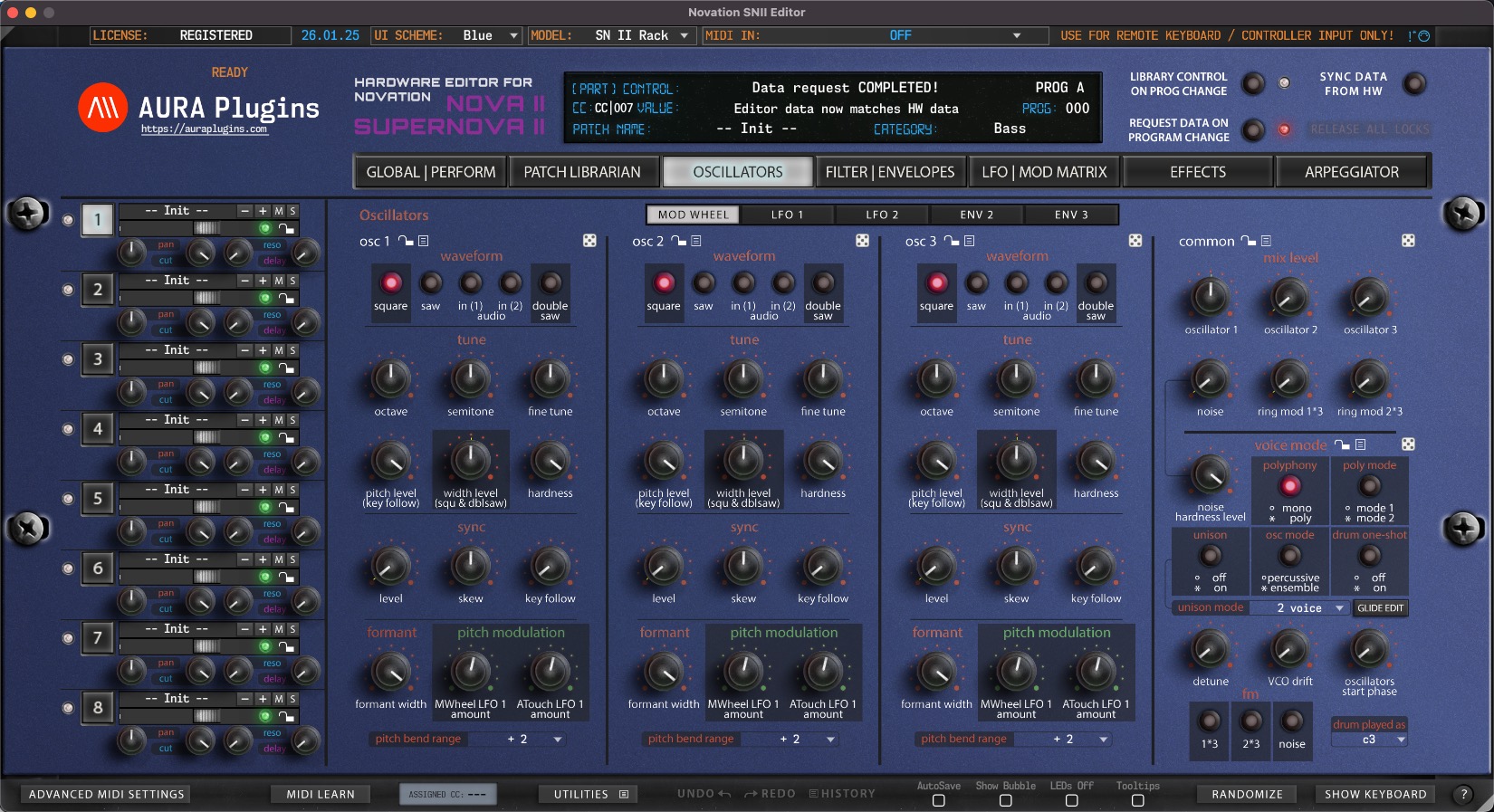
[ New ] Complete overhaul of the SN2x Editor with Apple Silicon support.
[ New ] Windows AAX, VST2, VST3 and Standalone Application for Win 7 and greater.
[ New ] macOS AU, AAX, VST2, VST3 and Standalone Application for macOS 10.12 and greater.
[ New ] User Interface redesign - requires macOS with Metal support.
[ New ] Realtime resizable graphics.
[ New ] Editor has dedicated 20-to-50 step Edit History with Undo and Redo.
[ New ] Librarian has dedicated 20-to-50 step Edit History with Undo and Redo.
[ New ] MIDI Learn per CC control can be defined with right clicking on parameter.
[ New ] LED is lit below the parameter name if MIDI CC is assigned.
[ New ] Randomizer dice to randomize each section with one click.
[ New ] Section controls to allow Section based presets and functions.
[ New ] Multi selection of items in librarian with shift+click or shift+arrow keys.
[ New ] Copy and Paste items with normal copy / paste commands.
[ New ] Onscreen Keyboard to trigger notes.
[ New ] MIDI mappings can be loaded or saved to hdd.
[ New ] Saving and Loading UI DATA which is essentially all parameters of the instance.
[ New ] Show Bubble control of current parameter when adjusting value.
[ New ] Show parameter values on Editor display when mouse is over the control.
[ New ] Adjust parameter Mod assignment with shift + mouse. Reset Mod assignment to default / last loaded value with shift + double click.
[ Fixed ] All previous bugs with the Editor should be cleared now.
[ Other ] User Manual is not yet available. Use tooltips to show function purpose. Most are self-explanatory.
[ Other ] Windows: Our signing certificate expired, so use right click -> open to install.
Issues with Editor? Open Support Ticket.
Join our Novation SN II Editor community over at Discord!
Want to support our development and free updates? Buy us a coffee!
[ New ] Complete overhaul of the SN2x Editor with Apple Silicon support.
[ New ] Windows AAX, VST2, VST3 and Standalone Application for Win 7 and greater.
[ New ] macOS AU, AAX, VST2, VST3 and Standalone Application for macOS 10.12 and greater.
[ New ] User Interface redesign - requires macOS with Metal support.
[ New ] Realtime resizable graphics.
[ New ] Editor has dedicated 20-to-50 step Edit History with Undo and Redo.
[ New ] Librarian has dedicated 20-to-50 step Edit History with Undo and Redo.
[ New ] MIDI Learn per CC control can be defined with right clicking on parameter.
[ New ] LED is lit below the parameter name if MIDI CC is assigned.
[ New ] Randomizer dice to randomize each section with one click.
[ New ] Section controls to allow Section based presets and functions.
[ New ] Multi selection of items in librarian with shift+click or shift+arrow keys.
[ New ] Copy and Paste items with normal copy / paste commands.
[ New ] Onscreen Keyboard to trigger notes.
[ New ] MIDI mappings can be loaded or saved to hdd.
[ New ] Saving and Loading UI DATA which is essentially all parameters of the instance.
[ New ] Show Bubble control of current parameter when adjusting value.
[ New ] Show parameter values on Editor display when mouse is over the control.
[ New ] Adjust parameter Mod assignment with shift + mouse. Reset Mod assignment to default / last loaded value with shift + double click.
[ Fixed ] All previous bugs with the Editor should be cleared now.
[ Other ] User Manual is not yet available. Use tooltips to show function purpose. Most are self-explanatory.
[ Other ] Windows: Our signing certificate expired, so use right click -> open to install.
Issues with Editor? Open Support Ticket.
Join our Novation SN II Editor community over at Discord!
Want to support our development and free updates? Buy us a coffee!
Full history: https://auraplugins.com/kb/article/novation-sn-ii-editor-changelog/
View in Shop
Start with Novation SN II Editor here
Most Viewed Content for Novation SN II Editor
Why my DAW crashes when I set MIDI in / out from the editor?
This is usually caused by the fact that your DAW has the MIDI port in use.
Be sure to follow our DAW User Guides to setup your environment properly before setting the MIDI ports.
Start with Setting MIDI Devices guide and follow up with the specific hardware instructions.
Why Editor displays DEMO version after purchasing the license?
You need to download and install FULL version of our Editor in order to register it.
Head down to https://auraplugins.com/my-account/ (login if prompted) – You should see the downloads links once logged in.
- Download the full installer and license.
- Install full version.
- Check license instructions and install license.
- Re-open the Editor to validate the license.
- When validation succeeds, Editor says “Registered” in the top left corner.
Do you have a roadmap for future projects?
Yes we do, but we keep the roadmap in our Discord server. You can follow our development and participate the upcoming features in our https://ko-fi.com/auraplugins page and by joining our Discord server.
How can I review your Product?
Navigate to https://auraplugins.com/my-account/ and login if prompted. Once logged in, you can review products you’ve purchased.
Next, go to https://auraplugins.com/products/ and choose the product you want to review.
Scroll down until you see Reviews tab and you can leave a review there!
Is there a way to support your Development?
Novation SN II Editor User Manual Feedback 0
Novation SN II Editor Changelog Feedback 0
Share this with fellow producers



