
Knowledge Base forRoland JP-80x0 Editor
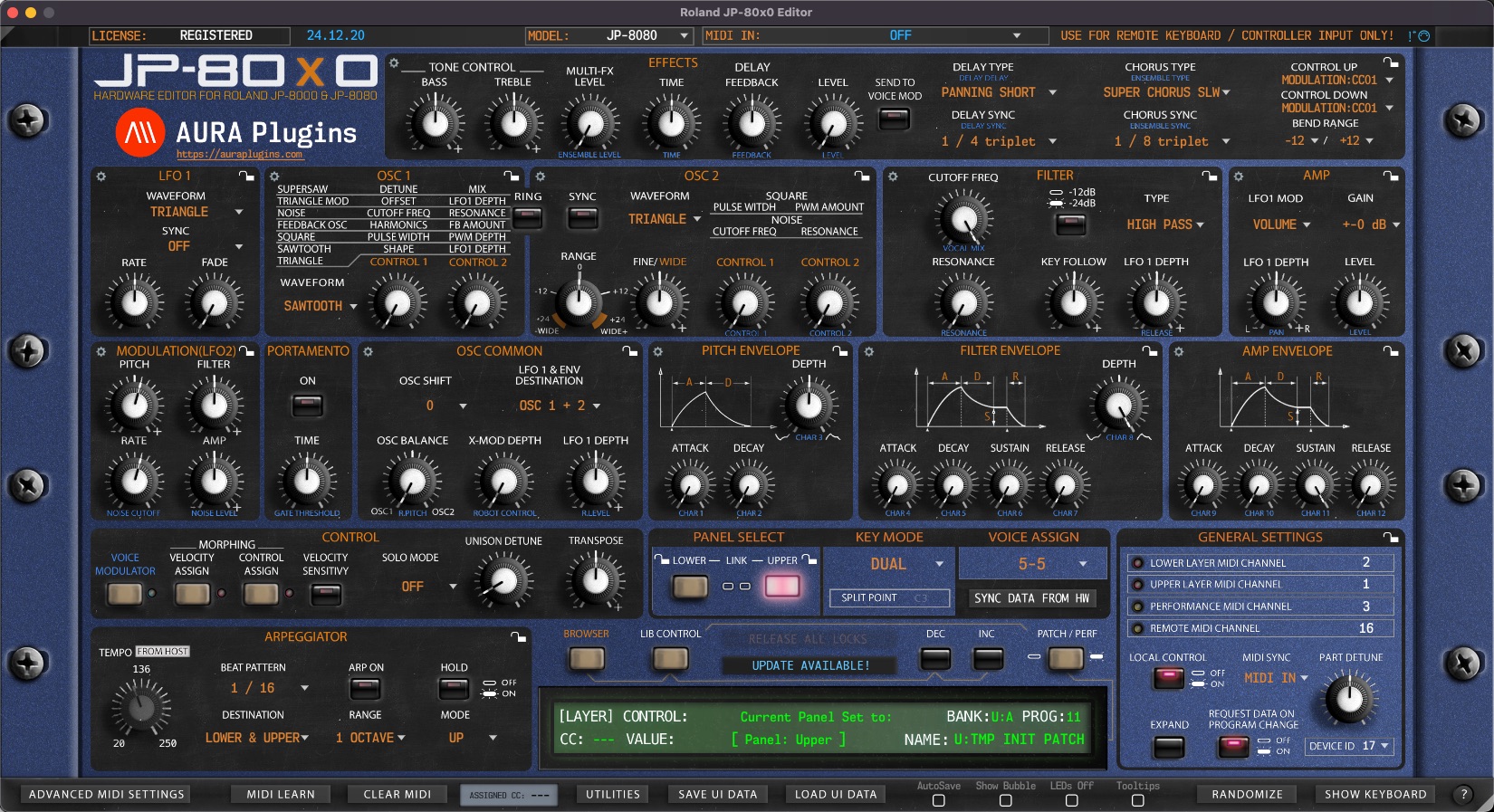
Documentation
Resources
Roland JP-80×0 Editor Changelog
Version 25.01.24
[ New ] When Panel Link is toggled on, Panel 1 & 2 are set in parallel or offset from each other. Offset option can be set via Utilities menu..
[ New ] Oscillator 1 and 2 Mode changes now show ie ”Osc 1 Supersaw Detune” in the Control Display.
[ Fixed ] Resolved issue where Librarian Data menu came visible after search was closed.
[ Fixed ] Resolved issue where Controls didn't send out values in some cases.
[ Fixed ] Resolved issue where Librarian froze after renaming patch.
[ Fixed ] Resolved issue where Layers were shown even when they were not supposed to.
[ Fixed ] Repositioned Rename Librarian slot panel. Quick Edit view blocked the visibility.
[ Fixed ] Resolved issue where Connection was not made when user manually changed Device ID from Editor before setting MIDI ports.
[ Other ] Don't request Performance data if Global data fails to be received.
[ Other ] Improvements to Librarian requests.
[ Other ] Improved parameter drawing when controls are adjusted.
Issues with Editor? Open Support Ticket.
Join our Roland JP-80X0 Editor community over at Discord!
Want to support our development and free updates? Buy us a coffee!
Version 24.12.21
[ Fixed ] Resolved issue where Magic Mouse scrolling macOS didn't work on some parameters.
[ Fixed ] Resolved issue where Logic failed to validate Audio Unit.
[ Fixed ] Some parameters didn't show proper values in control display.
[ Fixed ] Patch Init was not initialized properly.
[ Fixed ] Fixed issue where regular knob automation was stepped.
[ Fixed ] Fixed issue where LEDs would be stuck until playback was stopped.
[ Fixed ] Fixed issue where DAW would crash when hiding / showing Editor UI.
[ Fixed ] Fixed issue where Utilities Menu Load 4K/8K Graphics was stuck on.
[ Fixed ] Fixed issue where Editor could not remember last window view after reopening it.
[ Fixed ] Fixed issue where bubble control would not work unless defaulted was on.
[ Fixed ] Fixed issue where Editor would crash when data from librarian was dropped to part.
[ Fixed ] Fixed issues with graphical glitches.
- If interface scaling is set to auto, then editor remembers your window size per session.
- Any other interface scaling value is recalled when editor is opened.
[ Other ] Removed total recall interrupted notification as it didn't work out as expected.
[ Other ] Dropdown menus how show proper location on User Interface.
[ Other ] Some random graphics stuff here and there.
Version 24.10.23
[ New ] Last loaded value is shown in bubble control and editor value display with [*value] marker.
[ New ] Double click to reset parameter with last loaded value or default value. Option can be toggled from Utilities menu -> User Interface.
[ New ] Section Menu and Layer Edit menu now has items to revert section or layer to last loaded values.
[ New ] Smart Media Patches and Performances now available for JP-8080 users via the Editor.
[ New ] Added Adv MIDI Settings override function to Utilities MIDI Preferences menu.
[ New ] Added AutoSave, Show Bubble, LEDs Off and Tooltips override function to Utilities MIDI Preferences menu.
[ New ] Reworked User Manual and pointed URLs to main store pages.
[ New ] Finished Voice Modulator layer.
[ New ] macOS GPU now uses Metal framework. Mac minimum requirements: https://support.apple.com/en-us/102894
[ New ] Control Display shows time remaining when data is requested or sent.
[ New ] Added option in Utilities menu to bypass DAW MIDI CC processing and pass it directly to MIDI output port.
[ New ] Easy / Advanced Views to Patch Librarian with Quick Edit controls.
[ New ] Librarian search is now set individually per layer.
[ New ] Librarian search works with Performances as well.
[ New ] Randomizer can be set to exclude Type/Mode menus.
[ New ] various keyboard shortcuts added [panel select area (Q) and patch librarian (L)]:
- ctrl/cmd + c = copy part (Q, L)
- ctrl/cmd + v = paste data (Q, L)
- ctrl/cmd + i = initialize part (Q, L)
- ctrl/cmd + r = randomize part (Q)
- ctrl/cmd + g = get part from hardware (Q)
- ctrl/cmd + p = push part to hardware (Q)
- ctrl/cmd + l = lock part (Q)
- ctrl/cmd + r = rename librarian slot (L)
[ Fixed ] Resolved issue where bubble control value was not lined up with control display value.
[ Fixed ] Resolved issue where Editor would crash on DAW sample rate change.
[ Fixed ] Resolved issue where Bank and Program selection menus didn't work as expected.
[ Fixed ] Resolved issue where data was not properly handled when requesting Arrangement to user interface.
[ Fixed ] Resolved issue where automation didn't work as expected after data request from hardware.
[ Fixed ] (Windows) Resolved issue where Tooltips were not showing correct data.
[ Fixed ] Mod Wheel automation works as expected.
[ Fixed ] Model changes work as expected even when defaults are written.
[ Fixed ] Search results content was reset after selecting preset from the list.
[ Fixed ] Some layers were shown in wrong views.
[ Fixed ] Section Randomizer action didn't respect Randomizer settings from Utilities menu.
[ Fixed ] Librarian bank and patch number selections follow part change properly.
[ Fixed ] Part / Program changes would crash the Editor.
[ Fixed ] AutoSave, Show Bubble, LEDs Off and Tooltips override works as expected.
[ Fixed ] Solo Mode menu works as expected.
[ Fixed ] Env Type in Solo menu in General Settings view now responds to Layer changes.
[ Fixed ] Using Split Point menu no longer crashes the Editor.
[ Fixed ] Resolved issues with some layers parameter access.
[ Fixed ] Oscillator 2 External Waveform for JP-8080 works as expected.
[ Fixed ] Resolved issue where Abort Process button didn't work after clicking it once during session.
[ Fixed ] Layer right click menu now sends layer to hardware as expected.
[ Fixed ] Program and Bank menus and displays update accordingly even when requests are disabled.
[ Fixed ] Resolved issue where Requests didn't work as expected with both models.
[ Fixed ] Librarian left and right arrow keys work as expected.
[ Improvement ] Re-opening Plug-in takes less time now.
[ Improvement ] Requesting Data from hardware works much faster.
[ Improvement ] Sending Data to hardware works much faster.
[ Improvement ] Section Locks data send back works much faster now.
[ Improvement ] Added more safety checks to prevent crashes.
[ Improvement ] Parameter processing rewritten. Near zero CPU load when tweaking parameters!
[ Improvement ] Completely rewrote SysEx parameters. Now taking less CPU to process.
[ Improvement ] Completely rewrote Randomizer function.
[ Improvement ] Patch up and down buttons respond faster.
[ Improvement ] Control Display shows control values when mouse is over a parameter. Disable or Enable from Utilities -> User Interface menu.
[ Other ] Removed unused entities from Bank Edit and Utilities menus.
[ Other ] Fixed Bank Edit and Utilities menu naming schemes.
[ Other ] Editor log file renamed to Roland JP-80x0 Editor.log
[ Other ] SysEx data sending now follows Roland spec. This means data transfers might take a bit longer, but this ensures data is processed properly in hardware.
[ Other ] Librarian view is no longer reset when request is cancelled.
[ Other ] Removed spinning ball and windows cursor mods when data is processing.
Version 24.02.09
[ Fixed ] Resolved issue where Patch Velocity values were not sent properly to hardware.
[ Fixed ] Resolved issue where Global Data was not sent to hardware on Total Recall.
[ Fixed ] Resolved issue where librarian view would show wrong banks after Total Recall.
[ Fixed ] Resolved issue where SysEx controls would not work after patch change in some cases.
[ Fixed ] Resolved inaccurate control link issues.
[ Fixed ] Built-in MIDI clock is more accurate now and follow tempo change from DAW.
[ Other ] Improved Editor loading process.
[ Other ] Updated installer scripts on macOS.
Version 24.01.30
[ New ] Global Settings panel has been expanded with some missing system parameters which caused the synth to go out of tune during data recall.
[ Fixed ] Resolved issue where JP-8000 patch or performance data was not processed in librarian when Save Data To Slot was clicked.
[ Fixed ] Resolved issue where some popup menus caused DAW to crash while playback was on.
[ Fixed ] Resolved issue where MIDI data was duplicated while layers shared the same MIDI channel.
[ Fixed ] Resolved issue where Performance or Patch sending got stuck.
[ Fixed ] Resolved issue where Panel MIDI channel setting didn't work as expected.
[ Fixed ] About this Editor layer content corrected!
[ Other ] LED's now blink even when DAW playback is on.
[ Other ] General settings lock is off by default.
[ Other ] DAW CC passthrough is enabled by default.
[ Other ] Hardware Program Changes are enabled by default.
[ Other ] Removed PDFs from the installers. Up-to-date manual will be available online.
[ Improvement ] Graphics exported again due to faulty color codes.
Version 24.01.25
[ Fixed ] Resolved issue where Performance selection in library view changed back to the first item after data was sent.
[ Fixed ] Automation parameter list fixes and cleanup.
Version 24.01.24
[ Fixed ] Performance and Patch loading time improvements.
Version 24.01.23
[ Fixed ] Resolved issue where save as would write bank in classic format even when JP-8080 presets was in the bank.
[ Fixed ] Resolved issue where Audio Unit and VST3 would not load.
[ Fixed ] Resolved issue where values would be recalled wrong on VST3.
[ Fixed ] Resolved issue where locking one section would lock the entire layer.
[ Fixed ] Resolved issue where loading UI DATA now keeps the model unchanged.
[ Fixed ] Resolved issue where user could not disable hardware auto-connect.
[ Fixed ] Resolved issue where user would see wrong bank names in Browser after recalling a project.
[ Other ] GAIA, SH-201 and WinJPLib import is disabled while rewriting the functions.
[ Other ] Changed version numbering to more simplified yy-mm-ddd format.
Version 24.01.19
[ New ] Tooltips assigned from Roland JP-8080 user manual per parameter.
[ New ] If voice modulator is on, blue LED is lit next to the voice modulator button.
[ New ] If velocity or control assigns are active, red LED is lit next to the morphing buttons.
[ Fixed ] Resolved issue where Control and Velocity morphing didn't work properly for Osc 2 Fine and Range knobs.
[ Fixed ] Parameter values now show correct values in the Editor control display while adjusting values.
[ Fixed ] Default "init patch" parameter values applied during initialization.
[ Fixed ] Panel Unison Detune works as expected.
[ Fixed ] Panel Transpose works as expected.
[ Fixed ] Installer scripts revised to avoid errors.
Version 24.01.18
[ Fixed ] Resolved issue where Panel button could be toggled off manually.
[ Fixed ] Resolved issue where controls were not processed after requesting data to librarian.
Version 24.01.15
[ New ] Incoming MIDI clock signal received by Remote Input port is now passed to hardware.
[ New ] Experimental clock follows Editor and DAW tempo information.
[ New ] Drag'n'drop from Patches from librarian to part. Arrow will change to hand tool on top of set part name when drop can be performed.
[ New ] Right Click menu for Lower and Upper panel select buttons. Initialize, Randomize, Copy / Paste etc.
[ Fixed ] Utilities manual links were broken. Now if file is found, it will open it properly.
[ Fixed ] Resolved issue where MIDI LEDs triggered twice under certain circumstances.
[ Fixed ] Total Recall didn't work as expected if DAW playback was hit too early during recall process. Now data is recalled properly and warning is shown to user if the process is interrupted to push the data to hardware again.
[ Fixed ] Resolved issue where MIDI I/O sate was recalled incorrectly.
[ Fixed ] Resolved issue where editor could crash during loading.
[ Fixed ] Performance Requests to librarian work as expected.
[ Fixed ] Editor Performance Mode state saved with Editor save state.
[ Fixed ] Hardware Program Changes are now processed within Editor.
[ Fixed ] Osc2 Range and Fine Tune velocity and control morph values work as expected.
[ Fixed ] Resolved issue where X-MOD velocity morph change didn't work as expected.
[ Improvement ] Disabled Upper and Lower panel switches while Panel Link is toggled on.
[ Improvement ] MIDI channel changes are sent to hardware after Performance request is completed.
[ Improvement ] DeviceID probing works better.
[ Improvement ] Patch file logging was off. Now works much faster.
[ Improvement ] Part focus works as expected now.
[ Improvement ] Made changes to how incoming data is processed, therefore gaining more performance.
[ Improvement ] When data is sent or received, mouse pointer shows default OS waiting state.
[ Improvement ] Patch data transmission is much faster to hardware.
Version 23.12.30
[ New ] WinJPLib import. PRF and PAT files.
[ New ] Roland SH-201 import. MID, SHL and SHE files.
[ New ] Roland SH-01 GAIA import. SVD files for now.
[ Fixed ] Organized automation parameters into groups (Groups shown at least in Logic Pro).
[ Fixed ] Importing J8K files is working again.
[ Fixed ] Some parameter changes caused eternal internal loop causing crash.
Version 23.12.14
[ New ] If MIDI is received from Performance MIDI Channel and Panel Link is on, incoming message is distributed to both layers.
[ Fixed ] When operating in DUAL mode with control for top and bottom banks in LINK, switching to SINGLE mode disables ability to select bank (LINK is still active and cannot be deselected). Switching back to DUAL mode re-enables unlinking.
[ Fixed ] AMP Section: With LFO1 MOD in OFF, LFO1 DEPTH knob controls manual panning (akin to hardware switch PAN > MANUAL). Was glad the software still supported this, if it was intentional a UI indication of some kind might be nice (changing OFF setting to MANUAL?)
[ Fixed ] In DUAL mode with top + bottom in LINK, most controls I tested only work for one bank at a time, "remembering" which bank was selected before LINK-ing. At one point I got them both to control at once but appears mostly to just control one bank at a time.
[ Fixed ] Loading user performances (PATCH / PERF button lit and clicking/selecting from dropdown PROG) .. Had many small issues.
[ Fixed ] Resolved issue where Voice Assign values didn't match between hardware and software with JP-8080.
[ Fixed ] Resolved issue where Solo SW values didn't match between hardware and software with JP-8080.
[ New ] When Panel Link is toggled on, Panel 1 & 2 are set in parallel or offset from each other. Offset option can be set via Utilities menu..
[ New ] Oscillator 1 and 2 Mode changes now show ie ”Osc 1 Supersaw Detune” in the Control Display.
[ Fixed ] Resolved issue where Librarian Data menu came visible after search was closed.
[ Fixed ] Resolved issue where Controls didn't send out values in some cases.
[ Fixed ] Resolved issue where Librarian froze after renaming patch.
[ Fixed ] Resolved issue where Layers were shown even when they were not supposed to.
[ Fixed ] Repositioned Rename Librarian slot panel. Quick Edit view blocked the visibility.
[ Fixed ] Resolved issue where Connection was not made when user manually changed Device ID from Editor before setting MIDI ports.
[ Other ] Don't request Performance data if Global data fails to be received.
[ Other ] Improvements to Librarian requests.
[ Other ] Improved parameter drawing when controls are adjusted.
Issues with Editor? Open Support Ticket.
Join our Roland JP-80X0 Editor community over at Discord!
Want to support our development and free updates? Buy us a coffee!
Version 24.12.21
[ Fixed ] Resolved issue where Magic Mouse scrolling macOS didn't work on some parameters.
[ Fixed ] Resolved issue where Logic failed to validate Audio Unit.
[ Fixed ] Some parameters didn't show proper values in control display.
[ Fixed ] Patch Init was not initialized properly.
[ Fixed ] Fixed issue where regular knob automation was stepped.
[ Fixed ] Fixed issue where LEDs would be stuck until playback was stopped.
[ Fixed ] Fixed issue where DAW would crash when hiding / showing Editor UI.
[ Fixed ] Fixed issue where Utilities Menu Load 4K/8K Graphics was stuck on.
[ Fixed ] Fixed issue where Editor could not remember last window view after reopening it.
[ Fixed ] Fixed issue where bubble control would not work unless defaulted was on.
[ Fixed ] Fixed issue where Editor would crash when data from librarian was dropped to part.
[ Fixed ] Fixed issues with graphical glitches.
- If interface scaling is set to auto, then editor remembers your window size per session.
- Any other interface scaling value is recalled when editor is opened.
[ Other ] Removed total recall interrupted notification as it didn't work out as expected.
[ Other ] Dropdown menus how show proper location on User Interface.
[ Other ] Some random graphics stuff here and there.
Version 24.10.23
[ New ] Last loaded value is shown in bubble control and editor value display with [*value] marker.
[ New ] Double click to reset parameter with last loaded value or default value. Option can be toggled from Utilities menu -> User Interface.
[ New ] Section Menu and Layer Edit menu now has items to revert section or layer to last loaded values.
[ New ] Smart Media Patches and Performances now available for JP-8080 users via the Editor.
[ New ] Added Adv MIDI Settings override function to Utilities MIDI Preferences menu.
[ New ] Added AutoSave, Show Bubble, LEDs Off and Tooltips override function to Utilities MIDI Preferences menu.
[ New ] Reworked User Manual and pointed URLs to main store pages.
[ New ] Finished Voice Modulator layer.
[ New ] macOS GPU now uses Metal framework. Mac minimum requirements: https://support.apple.com/en-us/102894
[ New ] Control Display shows time remaining when data is requested or sent.
[ New ] Added option in Utilities menu to bypass DAW MIDI CC processing and pass it directly to MIDI output port.
[ New ] Easy / Advanced Views to Patch Librarian with Quick Edit controls.
[ New ] Librarian search is now set individually per layer.
[ New ] Librarian search works with Performances as well.
[ New ] Randomizer can be set to exclude Type/Mode menus.
[ New ] various keyboard shortcuts added [panel select area (Q) and patch librarian (L)]:
- ctrl/cmd + c = copy part (Q, L)
- ctrl/cmd + v = paste data (Q, L)
- ctrl/cmd + i = initialize part (Q, L)
- ctrl/cmd + r = randomize part (Q)
- ctrl/cmd + g = get part from hardware (Q)
- ctrl/cmd + p = push part to hardware (Q)
- ctrl/cmd + l = lock part (Q)
- ctrl/cmd + r = rename librarian slot (L)
[ Fixed ] Resolved issue where bubble control value was not lined up with control display value.
[ Fixed ] Resolved issue where Editor would crash on DAW sample rate change.
[ Fixed ] Resolved issue where Bank and Program selection menus didn't work as expected.
[ Fixed ] Resolved issue where data was not properly handled when requesting Arrangement to user interface.
[ Fixed ] Resolved issue where automation didn't work as expected after data request from hardware.
[ Fixed ] (Windows) Resolved issue where Tooltips were not showing correct data.
[ Fixed ] Mod Wheel automation works as expected.
[ Fixed ] Model changes work as expected even when defaults are written.
[ Fixed ] Search results content was reset after selecting preset from the list.
[ Fixed ] Some layers were shown in wrong views.
[ Fixed ] Section Randomizer action didn't respect Randomizer settings from Utilities menu.
[ Fixed ] Librarian bank and patch number selections follow part change properly.
[ Fixed ] Part / Program changes would crash the Editor.
[ Fixed ] AutoSave, Show Bubble, LEDs Off and Tooltips override works as expected.
[ Fixed ] Solo Mode menu works as expected.
[ Fixed ] Env Type in Solo menu in General Settings view now responds to Layer changes.
[ Fixed ] Using Split Point menu no longer crashes the Editor.
[ Fixed ] Resolved issues with some layers parameter access.
[ Fixed ] Oscillator 2 External Waveform for JP-8080 works as expected.
[ Fixed ] Resolved issue where Abort Process button didn't work after clicking it once during session.
[ Fixed ] Layer right click menu now sends layer to hardware as expected.
[ Fixed ] Program and Bank menus and displays update accordingly even when requests are disabled.
[ Fixed ] Resolved issue where Requests didn't work as expected with both models.
[ Fixed ] Librarian left and right arrow keys work as expected.
[ Improvement ] Re-opening Plug-in takes less time now.
[ Improvement ] Requesting Data from hardware works much faster.
[ Improvement ] Sending Data to hardware works much faster.
[ Improvement ] Section Locks data send back works much faster now.
[ Improvement ] Added more safety checks to prevent crashes.
[ Improvement ] Parameter processing rewritten. Near zero CPU load when tweaking parameters!
[ Improvement ] Completely rewrote SysEx parameters. Now taking less CPU to process.
[ Improvement ] Completely rewrote Randomizer function.
[ Improvement ] Patch up and down buttons respond faster.
[ Improvement ] Control Display shows control values when mouse is over a parameter. Disable or Enable from Utilities -> User Interface menu.
[ Other ] Removed unused entities from Bank Edit and Utilities menus.
[ Other ] Fixed Bank Edit and Utilities menu naming schemes.
[ Other ] Editor log file renamed to Roland JP-80x0 Editor.log
[ Other ] SysEx data sending now follows Roland spec. This means data transfers might take a bit longer, but this ensures data is processed properly in hardware.
[ Other ] Librarian view is no longer reset when request is cancelled.
[ Other ] Removed spinning ball and windows cursor mods when data is processing.
Version 24.02.09
[ Fixed ] Resolved issue where Patch Velocity values were not sent properly to hardware.
[ Fixed ] Resolved issue where Global Data was not sent to hardware on Total Recall.
[ Fixed ] Resolved issue where librarian view would show wrong banks after Total Recall.
[ Fixed ] Resolved issue where SysEx controls would not work after patch change in some cases.
[ Fixed ] Resolved inaccurate control link issues.
[ Fixed ] Built-in MIDI clock is more accurate now and follow tempo change from DAW.
[ Other ] Improved Editor loading process.
[ Other ] Updated installer scripts on macOS.
Version 24.01.30
[ New ] Global Settings panel has been expanded with some missing system parameters which caused the synth to go out of tune during data recall.
[ Fixed ] Resolved issue where JP-8000 patch or performance data was not processed in librarian when Save Data To Slot was clicked.
[ Fixed ] Resolved issue where some popup menus caused DAW to crash while playback was on.
[ Fixed ] Resolved issue where MIDI data was duplicated while layers shared the same MIDI channel.
[ Fixed ] Resolved issue where Performance or Patch sending got stuck.
[ Fixed ] Resolved issue where Panel MIDI channel setting didn't work as expected.
[ Fixed ] About this Editor layer content corrected!
[ Other ] LED's now blink even when DAW playback is on.
[ Other ] General settings lock is off by default.
[ Other ] DAW CC passthrough is enabled by default.
[ Other ] Hardware Program Changes are enabled by default.
[ Other ] Removed PDFs from the installers. Up-to-date manual will be available online.
[ Improvement ] Graphics exported again due to faulty color codes.
Version 24.01.25
[ Fixed ] Resolved issue where Performance selection in library view changed back to the first item after data was sent.
[ Fixed ] Automation parameter list fixes and cleanup.
Version 24.01.24
[ Fixed ] Performance and Patch loading time improvements.
Version 24.01.23
[ Fixed ] Resolved issue where save as would write bank in classic format even when JP-8080 presets was in the bank.
[ Fixed ] Resolved issue where Audio Unit and VST3 would not load.
[ Fixed ] Resolved issue where values would be recalled wrong on VST3.
[ Fixed ] Resolved issue where locking one section would lock the entire layer.
[ Fixed ] Resolved issue where loading UI DATA now keeps the model unchanged.
[ Fixed ] Resolved issue where user could not disable hardware auto-connect.
[ Fixed ] Resolved issue where user would see wrong bank names in Browser after recalling a project.
[ Other ] GAIA, SH-201 and WinJPLib import is disabled while rewriting the functions.
[ Other ] Changed version numbering to more simplified yy-mm-ddd format.
Version 24.01.19
[ New ] Tooltips assigned from Roland JP-8080 user manual per parameter.
[ New ] If voice modulator is on, blue LED is lit next to the voice modulator button.
[ New ] If velocity or control assigns are active, red LED is lit next to the morphing buttons.
[ Fixed ] Resolved issue where Control and Velocity morphing didn't work properly for Osc 2 Fine and Range knobs.
[ Fixed ] Parameter values now show correct values in the Editor control display while adjusting values.
[ Fixed ] Default "init patch" parameter values applied during initialization.
[ Fixed ] Panel Unison Detune works as expected.
[ Fixed ] Panel Transpose works as expected.
[ Fixed ] Installer scripts revised to avoid errors.
Version 24.01.18
[ Fixed ] Resolved issue where Panel button could be toggled off manually.
[ Fixed ] Resolved issue where controls were not processed after requesting data to librarian.
Version 24.01.15
[ New ] Incoming MIDI clock signal received by Remote Input port is now passed to hardware.
[ New ] Experimental clock follows Editor and DAW tempo information.
[ New ] Drag'n'drop from Patches from librarian to part. Arrow will change to hand tool on top of set part name when drop can be performed.
[ New ] Right Click menu for Lower and Upper panel select buttons. Initialize, Randomize, Copy / Paste etc.
[ Fixed ] Utilities manual links were broken. Now if file is found, it will open it properly.
[ Fixed ] Resolved issue where MIDI LEDs triggered twice under certain circumstances.
[ Fixed ] Total Recall didn't work as expected if DAW playback was hit too early during recall process. Now data is recalled properly and warning is shown to user if the process is interrupted to push the data to hardware again.
[ Fixed ] Resolved issue where MIDI I/O sate was recalled incorrectly.
[ Fixed ] Resolved issue where editor could crash during loading.
[ Fixed ] Performance Requests to librarian work as expected.
[ Fixed ] Editor Performance Mode state saved with Editor save state.
[ Fixed ] Hardware Program Changes are now processed within Editor.
[ Fixed ] Osc2 Range and Fine Tune velocity and control morph values work as expected.
[ Fixed ] Resolved issue where X-MOD velocity morph change didn't work as expected.
[ Improvement ] Disabled Upper and Lower panel switches while Panel Link is toggled on.
[ Improvement ] MIDI channel changes are sent to hardware after Performance request is completed.
[ Improvement ] DeviceID probing works better.
[ Improvement ] Patch file logging was off. Now works much faster.
[ Improvement ] Part focus works as expected now.
[ Improvement ] Made changes to how incoming data is processed, therefore gaining more performance.
[ Improvement ] When data is sent or received, mouse pointer shows default OS waiting state.
[ Improvement ] Patch data transmission is much faster to hardware.
Version 23.12.30
[ New ] WinJPLib import. PRF and PAT files.
[ New ] Roland SH-201 import. MID, SHL and SHE files.
[ New ] Roland SH-01 GAIA import. SVD files for now.
[ Fixed ] Organized automation parameters into groups (Groups shown at least in Logic Pro).
[ Fixed ] Importing J8K files is working again.
[ Fixed ] Some parameter changes caused eternal internal loop causing crash.
Version 23.12.14
[ New ] If MIDI is received from Performance MIDI Channel and Panel Link is on, incoming message is distributed to both layers.
[ Fixed ] When operating in DUAL mode with control for top and bottom banks in LINK, switching to SINGLE mode disables ability to select bank (LINK is still active and cannot be deselected). Switching back to DUAL mode re-enables unlinking.
[ Fixed ] AMP Section: With LFO1 MOD in OFF, LFO1 DEPTH knob controls manual panning (akin to hardware switch PAN > MANUAL). Was glad the software still supported this, if it was intentional a UI indication of some kind might be nice (changing OFF setting to MANUAL?)
[ Fixed ] In DUAL mode with top + bottom in LINK, most controls I tested only work for one bank at a time, "remembering" which bank was selected before LINK-ing. At one point I got them both to control at once but appears mostly to just control one bank at a time.
[ Fixed ] Loading user performances (PATCH / PERF button lit and clicking/selecting from dropdown PROG) .. Had many small issues.
[ Fixed ] Resolved issue where Voice Assign values didn't match between hardware and software with JP-8080.
[ Fixed ] Resolved issue where Solo SW values didn't match between hardware and software with JP-8080.
Share this with fellow producers



