
Knowledge Base forClavia Nord 2 Editor
Documentation
Resources
Clavia Nord 2 Editor Changelog
Version 26.05.16
[ New ] Librarian has option to sort right list items alphabetically.
[ Fixed ] Resolved issue where MIDI learn didn't work properly.
[ Fixed ] Resolved issue where update url was scoped even when the option was disabled from Utilities menu.
[ Fixed ] Resolved issue where Load UI Data function changed MIDI I/O, DeviceID, Global MIDI Ch, UI SKIN and Main tab values.
[ Fixed ] Resolved issue where double clicking item from the librarian would show a warning message under certain circumstances.
[ Fixed ] Show Keyboard toggle is now turned off when loading UI Data to prevent graphical glitches.
[ Improvement ] AAX loads faster with better stability.
[ Improvement ] Librarian functions and stability improved.
[ Improvement ] Librarian requests are processed faster.
[ Improvement ] Improved compatibility with NodalRed2x.
[ Other ] Product URLs updated to support upcoming User Manual update. Use tooltips to show function purpose. Most are self-explanatory.
[ Other ] Windows: Our signing certificate expired, so use right click -> open to install.
Issues with Editor? https://auraplugins.com/my-account/tickets/
Join our Clavia Nord Editor community over at https://discord.gg/TeG7ukYcVW
Want to support our development and free updates? https://auraplugins.com/?ff_landing=6
Version 25.08.19
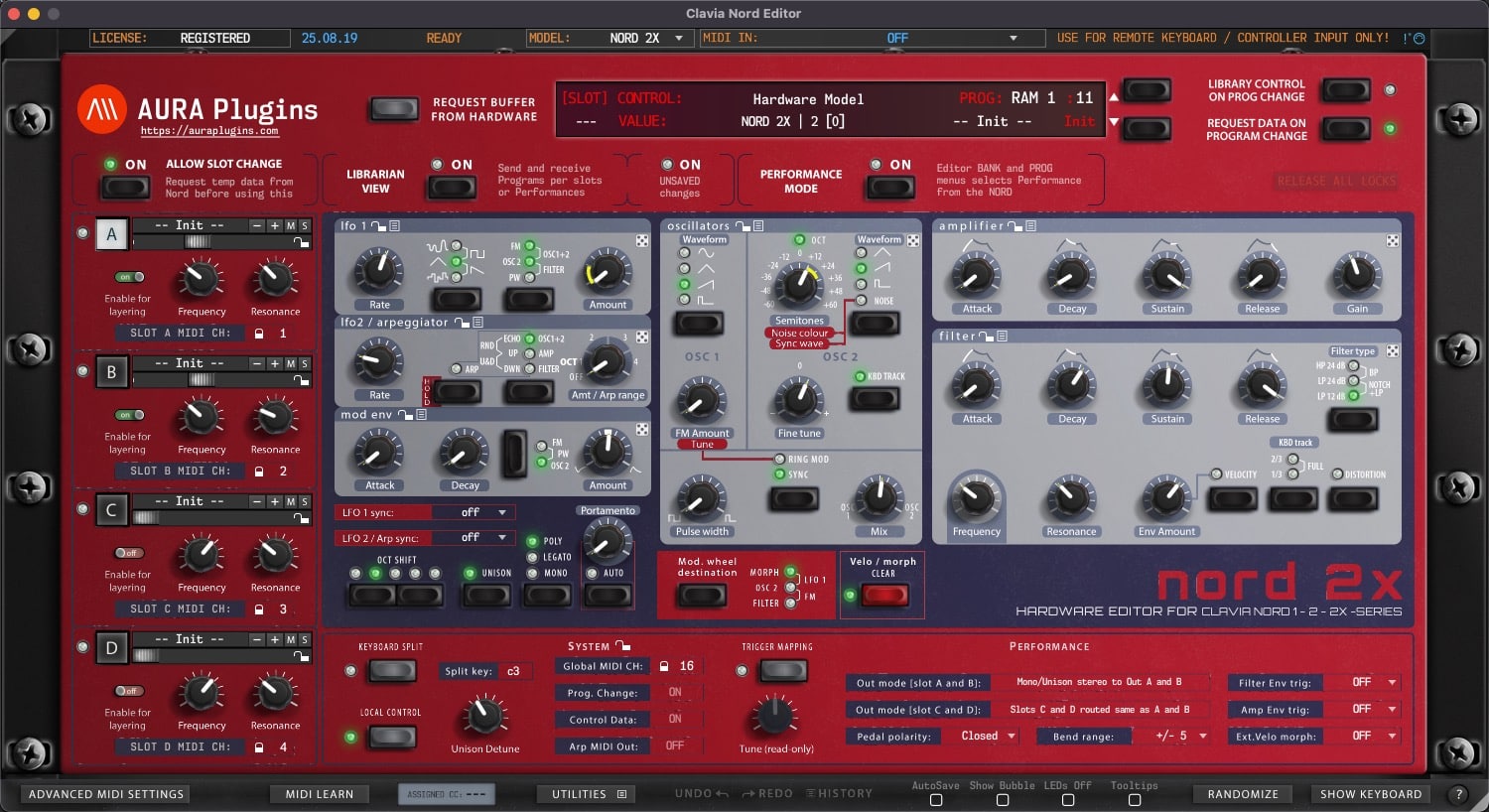
[ New ] Complete overhaul of the Nord Editor with Apple Silicon support.
[ New ] Windows AAX, VST2, VST3 and Standalone Application for Win 7 and greater.
[ New ] macOS AU, AAX, VST2, VST3 and Standalone Application for macOS 10.12 and greater.
[ New ] User Interface redesign.
[ New ] Realtime resizable graphics.
[ New ] Editor has dedicated 20-to-50 step Edit History with Undo and Redo.
[ New ] Librarian has dedicated 20-to-50 step Edit History with Undo and Redo.
[ New ] MIDI Learn per CC control can be defined with right clicking on parameter.
[ New ] LED is lit below the parameter name if MIDI CC is assigned.
[ New ] Randomizer dice to randomize each section with one click.
[ New ] Section controls to allow Section based presets and functions.
[ New ] Multi selection of items in librarian with shift+click or shift+arrow keys.
[ New ] Copy and Paste items with normal copy / paste commands.
[ New ] Onscreen Keyboard to trigger notes.
[ New ] MIDI mappings can be loaded or saved to hdd.
[ New ] Saving and Loading UI DATA which is essentially all parameters of the instance.
[ New ] Show Bubble control of current parameter when adjusting value.
[ New ] Show parameter values on Editor display when mouse is over the control.
[ New ] Adjust parameter morphing with shift + mouse. Reset morphing to default / last loaded value with shift + double click.
[ New ] Name length for Performance, Percussion Kit and Programs is now 16 characters.
[ New ] Each Program, Percussion Kit and Performance can have category assigned.
[ New ] Quick Edit mode in Librarian view with assignable XY Pad and essential controls.
[ New ] Tooltips included from Nord 2X User Manual.
[ New ] Top bar has indicator for data transmission back and forth.
[ Fixed ] All previous bugs with the Editor should be cleared now.
[ Note ] Performance mode is required.
[ Note ] Global MIDI Channel should be set to 16.
[ Note ] When saving to MIDI format, names & categories are not stored since it is not in Nord specs, but our custom addition.
[ Note ] Percussion Mode is under investigation to see if we can fully implement it.
[ Other ] User Manual is not yet available.
[ Other ] Windows: Our signing certificate expired, so use right click -> open to install.
[ New ] Librarian has option to sort right list items alphabetically.
[ Fixed ] Resolved issue where MIDI learn didn't work properly.
[ Fixed ] Resolved issue where update url was scoped even when the option was disabled from Utilities menu.
[ Fixed ] Resolved issue where Load UI Data function changed MIDI I/O, DeviceID, Global MIDI Ch, UI SKIN and Main tab values.
[ Fixed ] Resolved issue where double clicking item from the librarian would show a warning message under certain circumstances.
[ Fixed ] Show Keyboard toggle is now turned off when loading UI Data to prevent graphical glitches.
[ Improvement ] AAX loads faster with better stability.
[ Improvement ] Librarian functions and stability improved.
[ Improvement ] Librarian requests are processed faster.
[ Improvement ] Improved compatibility with NodalRed2x.
[ Other ] Product URLs updated to support upcoming User Manual update. Use tooltips to show function purpose. Most are self-explanatory.
[ Other ] Windows: Our signing certificate expired, so use right click -> open to install.
Issues with Editor? https://auraplugins.com/my-account/tickets/
Join our Clavia Nord Editor community over at https://discord.gg/TeG7ukYcVW
Want to support our development and free updates? https://auraplugins.com/?ff_landing=6
Version 25.08.19
[ New ] Complete overhaul of the Nord Editor with Apple Silicon support.
[ New ] Windows AAX, VST2, VST3 and Standalone Application for Win 7 and greater.
[ New ] macOS AU, AAX, VST2, VST3 and Standalone Application for macOS 10.12 and greater.
[ New ] User Interface redesign.
[ New ] Realtime resizable graphics.
[ New ] Editor has dedicated 20-to-50 step Edit History with Undo and Redo.
[ New ] Librarian has dedicated 20-to-50 step Edit History with Undo and Redo.
[ New ] MIDI Learn per CC control can be defined with right clicking on parameter.
[ New ] LED is lit below the parameter name if MIDI CC is assigned.
[ New ] Randomizer dice to randomize each section with one click.
[ New ] Section controls to allow Section based presets and functions.
[ New ] Multi selection of items in librarian with shift+click or shift+arrow keys.
[ New ] Copy and Paste items with normal copy / paste commands.
[ New ] Onscreen Keyboard to trigger notes.
[ New ] MIDI mappings can be loaded or saved to hdd.
[ New ] Saving and Loading UI DATA which is essentially all parameters of the instance.
[ New ] Show Bubble control of current parameter when adjusting value.
[ New ] Show parameter values on Editor display when mouse is over the control.
[ New ] Adjust parameter morphing with shift + mouse. Reset morphing to default / last loaded value with shift + double click.
[ New ] Name length for Performance, Percussion Kit and Programs is now 16 characters.
[ New ] Each Program, Percussion Kit and Performance can have category assigned.
[ New ] Quick Edit mode in Librarian view with assignable XY Pad and essential controls.
[ New ] Tooltips included from Nord 2X User Manual.
[ New ] Top bar has indicator for data transmission back and forth.
[ Fixed ] All previous bugs with the Editor should be cleared now.
[ Note ] Performance mode is required.
[ Note ] Global MIDI Channel should be set to 16.
[ Note ] When saving to MIDI format, names & categories are not stored since it is not in Nord specs, but our custom addition.
[ Note ] Percussion Mode is under investigation to see if we can fully implement it.
[ Other ] User Manual is not yet available.
[ Other ] Windows: Our signing certificate expired, so use right click -> open to install.
Share this with fellow producers



